

WhatsApp has introduced a powerful new tool for businesses: Marketing Messages Lite API (MM Lite API). Here's how it helps companies reduce campaign costs while improving delivery rates and engagement.
What is Marketing Messages Lite API?
MM Lite API is WhatsApp's enhanced channel for marketing campaigns that uses smart filtering to ensure your messages reach the right people at the right time.
In regions where the tool operates at full capacity, the system analyzes how users interact with branded messages: whether they open them, click links, or make purchases. Meta uses this behavioral data to identify genuinely interested recipients and delivers messages only to this qualified segment.
When user behavior signals disinterest (unopened messages, consistent ignoring, or spam reports), the system automatically excludes them from future campaigns. This reduces the risk of account restrictions, improves audience quality, and cuts costs. You only pay for messages delivered to users likely to engage.
Key benefits for your business
Marketing Messages Lite API helps you:
- Reach engaged users only: no wasted sends to inactive contacts
- Improve conversion rates: by targeting a more relevant audience
- Reduce campaign costs: pay only for messages that reach interested recipients
- Protect your account: fewer spam complaints mean lower risk of restrictions
In countries with full functionality, businesses report up to 9% improvement in delivery rates and measurable ROMI gains.
How MM Lite API works: full vs. limited functionality
Marketing Messages Lite API delivers its complete feature set in most countries worldwide. The system uses advanced behavioral analysis and machine learning to optimize your campaigns automatically.
However, in certain regions—including Russia, EU, US, Japan, South Korea, and some other countries—the tool operates in a simplified mode due to regional data processing regulations.
In regions with full functionality, you get:
- Automatic delivery time optimization: messages are sent when users are most likely to engage (within 24 hours)
- Delayed delivery: schedule messages up to 24 hours in advance
- Advanced analytics: detailed click tracking, CTR, and conversion metrics
In regions with limitations, some features work differently:
- Delivery time optimization is disabled: messages send immediately rather than at optimal times
- Delayed delivery (within 24 hours) is unavailable
- Click and conversion statistics aren't displayed
Regardless of region, MM Lite API's core value works everywhere. The system filters out inactive contacts and users who've hit marketing limits, so you only pay for messages delivered to engaged recipients. This protects your account from spam complaints and reduces wasted spend, no matter where your business operates.
Regional Feature Comparison
The functionality you'll experience depends on where your message recipients are located. Here's what's available in each region:
| Feature | Most Countries (Full Functionality) | Russia, EU, US, Japan, South Korea (Limited Mode) |
| Delivery time optimization | ✅ Works. System analyzes user activity and delivers at optimal time (within 24 hours) | ❌ Disabled. Messages send immediately |
| Delayed delivery | ✅ Up to 24 hours from send time | ❌ Immediate send only |
| Marketing limits filtering | ✅ Works. Messages aren't delivered to users who've hit limits | ✅ Works. Messages aren't delivered to users who've hit limits |
| Savings on undelivered messages | ✅ You don't pay for undelivered messages | ✅ You don't pay for undelivered messages |
| Account protection | ✅ Fewer spam complaints = lower restriction risk | ✅ Fewer spam complaints = lower restriction risk |
| Advanced analytics | ✅ Click stats, CTR, conversions available | ❌ Basic stats only: deliveries, reads, cost |
| Priority settings (time-sensitive) | ✅ Can mark urgent messages for immediate delivery | ⚠️ Setting available but no effect (all messages send immediately) |
Core MM Lite API features
1. Smart Audience Filtering
MM Lite API automatically identifies users who've reached Meta's marketing limits. This happens when a user:
- Receives too many marketing campaigns from various brands
- Consistently ignores messages (doesn't open or read them)
- Reports messages as spam
These recipients are automatically excluded from your campaign. You don't pay for delivery, and your account stays protected from complaints.
2. Delivery Time Optimization (Available in Most Markets)
In most countries worldwide, Meta analyzes:
- When users are most active on WhatsApp
- When they typically open and read messages
- Interaction patterns with different brands
Based on this data, the system chooses the optimal delivery time within 24 hours of your send.
Example: you launch a campaign at 11 PM. Meta sees your customer is usually active on WhatsApp between 8-10 AM. The message will be delivered in the morning when engagement probability is highest.
Note: in some regions (Russia, EU, US, Japan, South Korea), messages send immediately due to data processing regulations.
3. Flexible Priority Settings
For urgent messages (like order confirmations or delivery notifications), you can set the time-sensitive flag. These messages bypass time optimization and deliver immediately.
This is particularly useful when you need instant delivery but still want the benefits of audience filtering and cost optimization.
Note: in regions where all messages send immediately, this flag doesn't change delivery timing but remains available for future use as Meta expands regional capabilities.
4. Account Reputation Protection
An undelivered message isn't a lost contact; it's business protection. When the system filters out recipients with exhausted limits, it prevents:
- Spam complaints
- Poor campaign quality ratings
- Risk of Meta restrictions and blocks
This is especially critical for companies running regular marketing campaigns who depend on stable WhatsApp Business API access.
How to enable MM Lite API
Setup takes just a few minutes:
- Log into Facebook Business Manager
- Navigate to Business Info > Data Sharing
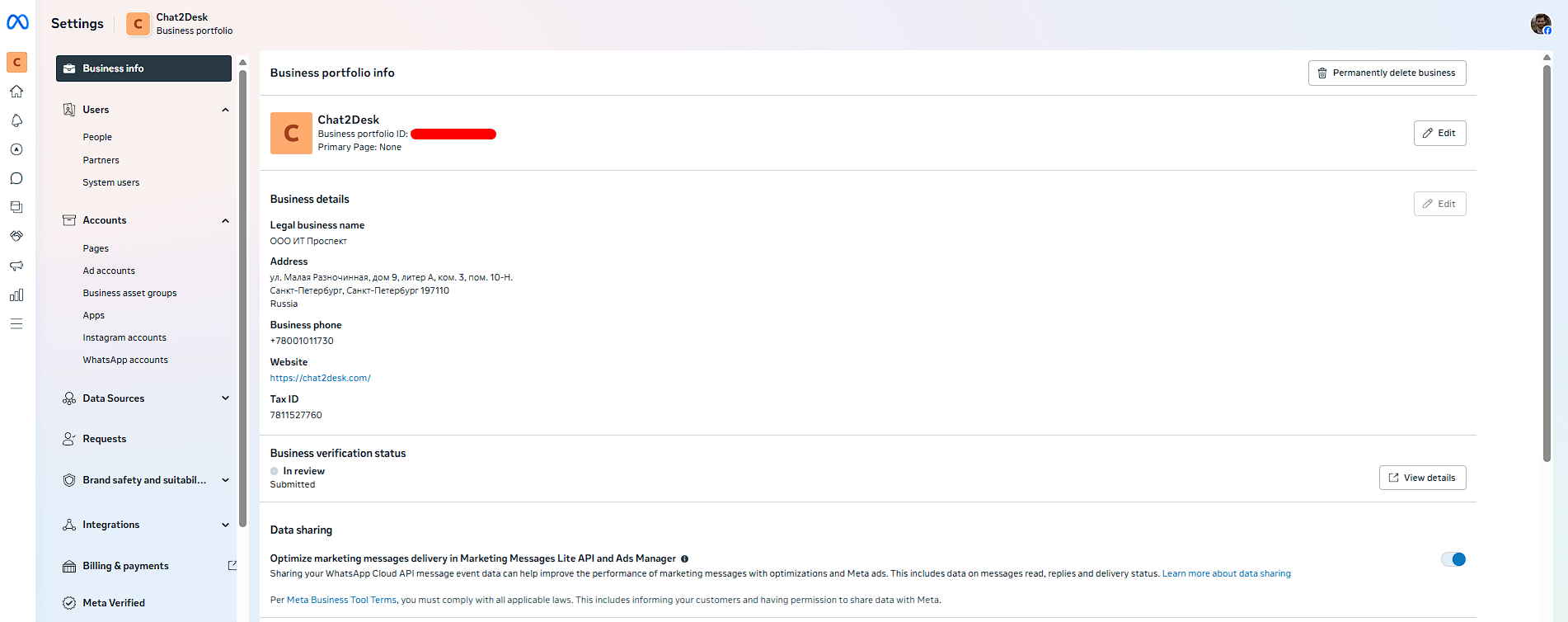
- Enable Optimize marketing messages delivery in Marketing Messages Lite API and Ads Manager
- Verify your WABA account: FBM > WhatsApp Accounts > [your account] > Privacy and Data Sharing > enable Optimize marketing messages by sharing event activity with Meta
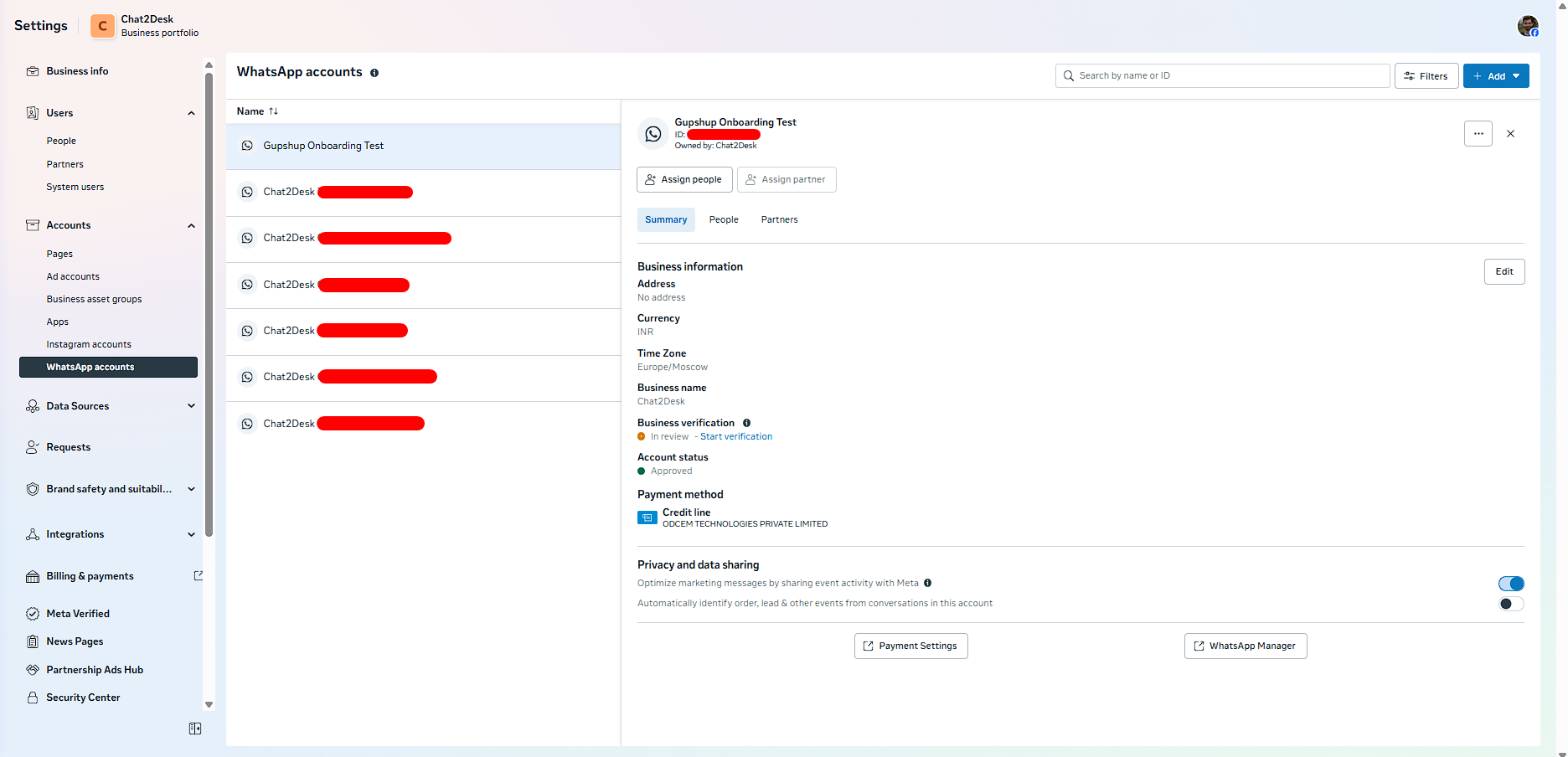
After activation, WhatsApp begins using optimization algorithms within available regional constraints. Chat2Desk users don't need to change templates or settings. Once enabled, campaigns automatically use MM Lite API.
When to use MM Lite API for marketing campaigns
The tool is especially valuable when precision targeting and budget efficiency matter:
- Sales and seasonal promotions: avoid overspending on mass campaigns
- Customer reactivation: re-engage audiences who haven't responded recently
- Testing new offers: identify which segments respond best
If you run regular promotional campaigns, MM Lite API offers a straightforward way to improve ROI without increasing spend.
Analytics and campaign costs
In Chat2Desk, all messages sent via MM Lite API appear in statistics with appropriate labeling.
For most markets, you'll see comprehensive metrics including:
- Messages sent and delivered
- Read counts and read rates
- Click-through rates (CTR)
- Conversion tracking
- Cost per campaign
For markets with data processing restrictions (Russia, EU, US, Japan, South Korea), you'll have access to core metrics: delivery counts, read rates, and campaign costs.
As of July 1, 2025, Meta established unified pricing for Cloud API and MM Lite API: costs depend on recipient region and template category.
Savings come not from discounts, but from precise delivery. You only pay for results.
The future of Marketing Messages Lite API
WhatsApp continues developing Marketing Messages Lite API: expanding geographic coverage, adding new metrics, and improving algorithms.
By connecting the tool now, your business builds ready infrastructure for future updates and stays ahead of competitors.
Chat2Desk supports MM Lite API connection for both WABA providers: Gupshup and 360dialog. To activate the functionality, message us via the widget in the bottom right corner, and we'll help with setup. If needed, we can also assist with provider migration while preserving all your chat history.


